

Download MigrateEmails EMLX Converter Tool – Free EMLX to PST, PDF, HTML, MSG, EML Conversion for Windows
Looking for a reliable way to convert your EMLX files on Windows? The MigrateEmails EMLX Converter Tool is a powerful, free software designed to help users seamlessly convert EMLX files to popular formats like PST, PDF, HTML, MSG, and EML. Ideal for Mac-to-Windows users migrating email data, this tool ensures secure, fast, and batch-friendly conversions without data loss. With a clean interface and no complex setup, it's one of the best file management tools for handling email archives efficiently.
Why Choose MigrateEmails EMLX Converter Tool? Key Features Explained
When it comes to managing email data, especially when switching from Mac to Windows, the MigrateEmails EMLX Converter Tool stands out as a top-tier solution. This software is specifically designed for Windows users who need to convert EMLX files—commonly used by Apple Mail—into widely supported formats such as PST, PDF, HTML, MSG, and EML. One of its standout features is the ability to perform batch conversions, allowing users to process multiple EMLX files at once, saving hours of manual effort. This makes it ideal for businesses, freelancers, and individuals managing large volumes of archived emails.
Another major advantage is the tool’s data integrity guarantee. Every conversion is performed without altering the original file structure, preserving metadata, attachments, sender details, and formatting. This ensures that your emails remain fully functional and accessible after conversion. The software also supports nested folders, meaning your email hierarchy is maintained during the migration process. Whether you're transferring personal emails or business records, the tool ensures nothing gets lost in translation.
Security is a top priority. The tool operates offline and does not upload your files to any server, making it a secure choice for handling sensitive information. It’s also lightweight and fast—no heavy system resources required—making it suitable for both older and modern Windows machines. With a simple drag-and-drop interface, even non-technical users can start converting files within seconds. Whether you're using Windows 10, 11, or older versions, this software delivers consistent performance across all supported platforms.
Easy Installation & Step-by-Step Usage Guide
Downloading and installing the MigrateEmails EMLX Converter Tool is a breeze, designed with user-friendliness in mind. The process begins by visiting the official website and clicking the “Download Free” button. The installer is a small, secure file (under 10MB) that runs without requiring admin rights on most systems. Once downloaded, simply double-click the installer and follow the on-screen prompts. The entire installation takes less than a minute, and the tool runs immediately after setup.
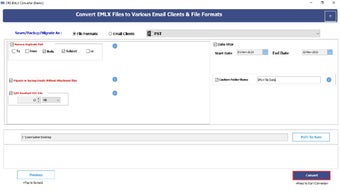
After installation, launch the application. You’ll be greeted with a minimalist interface featuring a central “Add Files” button. Click it to browse and select one or multiple EMLX files from your Mac backup, external drive, or cloud storage. For batch processing, hold down the Ctrl key (or Shift) to select several files at once. Once added, choose your desired output format from the dropdown menu—PST for Outlook compatibility, PDF for sharing, HTML for web use, MSG for Outlook Express, or EML for cross-platform consistency.
Next, specify the destination folder where you want the converted files saved. The tool supports custom naming options, so you can keep your files organized. Finally, click “Convert” and watch the progress bar.
The software provides real-time updates and logs conversion status. Most conversions complete in seconds, even for large files. Once done, you can open the converted files directly in your preferred email client or viewer.
The entire workflow is intuitive and requires no technical knowledge, making it accessible to users of all skill levels.
Compatibility & System Requirements
The MigrateEmails EMLX Converter Tool is built specifically for the Windows operating system, ensuring full compatibility with all major versions. It supports Windows 7, 8, 8.1, 10, and 11, both 32-bit and 64-bit editions. Whether you're using a desktop, laptop, or work computer, this tool integrates smoothly into your existing setup without conflicts. It doesn’t require any additional software like Microsoft Outlook to function—making it a standalone solution perfect for users who don’t have or don’t want to install Outlook.
System requirements are modest, ensuring accessibility across a wide range of devices. You’ll need at least 1 GB of RAM, 50 MB of free disk space, and a processor running at 1 GHz or higher. The tool is optimized to run efficiently on older hardware, so even legacy systems can handle EMLX conversions without lag. It’s also compatible with external storage devices, allowing you to directly convert files from USB drives, SD cards, or network drives—ideal for users migrating from Mac backups stored on external media.
While the tool is currently exclusive to Windows, its functionality makes it a must-have for Mac users who have exported their email archives and now need to access them on a PC. It’s particularly useful for IT administrators managing cross-platform migrations, small business owners transferring client records, or individuals moving to a new email ecosystem. With no need for complex scripting or third-party plugins, this tool delivers a plug-and-play experience that works out of the box.
Pros & Cons – What Users Are Saying
- Pros:
- Free to download and use with no hidden fees
- Supports multiple output formats: PST, PDF, HTML, MSG, EML
- Batch conversion for high-efficiency processing
- Preserves all original data including attachments and metadata
- Offline operation ensures data privacy and security
- Lightweight and fast, even on older PCs
- Simple drag-and-drop interface for beginners
- Compatible with all Windows versions (7 to 11)
- Cons:
- Currently only available for Windows (no Mac or Linux version)
- No built-in email client integration (must open files manually)
- Advanced features like filtering or tagging are not available
- Supports only EMLX files (no other Mac email formats)
- Limited customer support (no live chat or phone assistance)
Frequently Asked Questions (FAQ)
Can I convert EMLX files to PST for Outlook?
Yes. The MigrateEmails EMLX Converter Tool allows you to convert EMLX files directly to PST format, which is fully compatible with Microsoft Outlook. This makes it ideal for users migrating from Apple Mail to Outlook on Windows.
Is the tool safe to use? Does it upload my files?
No. The software operates entirely offline. Your EMLX files are never sent to any server. All processing happens locally on your machine, ensuring maximum security and privacy.
Can I convert multiple EMLX files at once?
Yes. The tool supports batch conversion. You can select multiple EMLX files at once and convert them to your chosen format in a single session, saving significant time.
Do I need Outlook installed to use this tool?
No. You do not need Microsoft Outlook installed. The tool works independently and converts files into standard formats that can be opened with any compatible software.
Is there a Mac version available?
Not yet. The MigrateEmails EMLX Converter Tool is currently only available for Windows. However, Mac users can export their EMLX files and use the tool on a Windows PC for conversion.
Final Verdict & Call to Action
If you’re a Windows user dealing with EMLX files from a Mac, the MigrateEmails EMLX Converter Tool is one of the best free tools available. It combines ease of use, speed, and data security in a single package. With support for multiple output formats, batch processing, and full metadata preservation, it’s a reliable choice for both personal and professional use.
While it lacks Mac compatibility and advanced features, its core purpose—converting EMLX files efficiently—is executed flawlessly. For anyone needing to migrate email data from Mac to Windows, this tool is a must-have. Download it today and experience seamless email conversion without the hassle.
? Download MigrateEmails EMLX Converter Tool now—free, secure, and updated regularly for optimal performance.







